Each of our Expression Web templates contains helpful information within each web page. We also include a helpful "template instructions" page you can print for easy reference. We offer live previews and immediate product downloads. We created this Help Center for those who want or need more in-depth information. If you feel you need more help, we don't require you to fill out a support ticket or check a forum for answers. Just email us your questions and we'll get back to you with the answers you need, usually within 24 hours. We support each template sold for a full twelve months.
 Once you have completed the purchase process through our shopping cart
system, you will be directed to a page that has a link to the template file.
There are instructions on the page to help you proceed.
Once you have completed the purchase process through our shopping cart
system, you will be directed to a page that has a link to the template file.
There are instructions on the page to help you proceed.
Open Expression Web. Go to Site > Open Site. An Open Site window will appear.
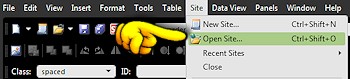
Since this is the first time you will be opening your new web, click on the Browse button. Browse to where you copied your new web folder. Most often, this will be in the My Web Sites folder.
Locate your new web folder. Once you have selected your web folder, you will see the information appear in the Open Site dialog box.
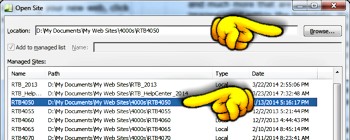
If you would like for Expression Web to remember this location, place a check next to "Add to managed list". Click the Open button located on the bottom of the dialog box.
Your web site will open in Expression Web. You will see the file path of your web in the bottom status bar. You will also see the Site View tab that allows you to see the files and folders included in your web
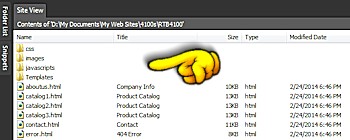
You will see whatever panels you have elected to have open. Panels can be opened and closed and can sit on the left and right sides of your screen.
Root Web: You have probably heard the term "root web" used. This is your main web folder where the home page (index.htm or default.htm) resides. Typically, all of the web pages will reside inside of the root web folder.
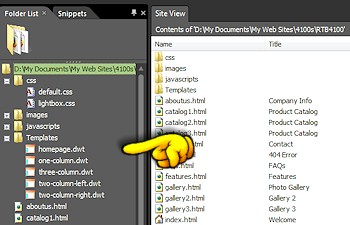
CSS Folder or File: Your template will have one or more files that ends with a .css extension. This file is the style sheet and contains the formatting instructions for colors, links, headings, and much more that are used within every page. Along with the images used within the template, this file is what determines your pages' appearance when viewed through your browser.
Template Folder: Our Expression Web templates will have one or more files that end in .dwt. This stands for Dynamic Web Template. There will be a dwt file for each page layout (1-column, 2-column, etc.) included in your web package. When you edit a dwt page, the changes are applied to every page that is attached (or uses) that dwt page.
Images Folder: This folder contains all of the images that are used on the various pages of your web. We often add other folders within this folder to make it easier to find what you are looking for. Main template images are found inside of the images folder. Other images like our product catalog and gallery samples, lightbox images, social media icons, etc. are located within their own folders.
Calendar & Other Scripts: One or more scripts may be in a JavaScripts folder. Your template may contain a JavaScript to display a slideshow. Your template may contain a JavaScript Lightbox. Specific details on editing the images will be explained in your web package. Note that JavaScripts are not visible in Design view, but will be seen when you preview your web and when it is published.
